Description
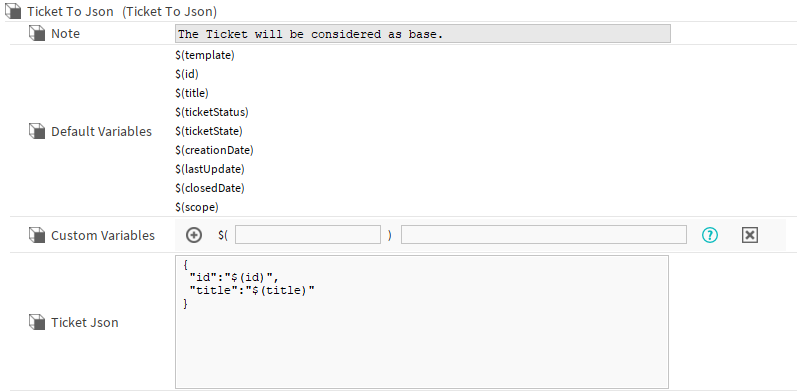
The TicketToJson component defines the blueprint for the JsonObject representing a single Ticket.
It functions similarly to HttpConfig:
You can create custom variables using SFormat, which can then be reused throughout your JSON structure.
In addition to your own variables, you’ll also have access to a set of default variables, giving you flexibility and consistency when shaping the exported data.
Implementation
-
Present by default in the HttpConfig in the TicketExport.
-
Customize it
-
Trigger the
executeaction on the grandparentTicketExportcomponent.
Properties
-
Note: Additional informations.
-
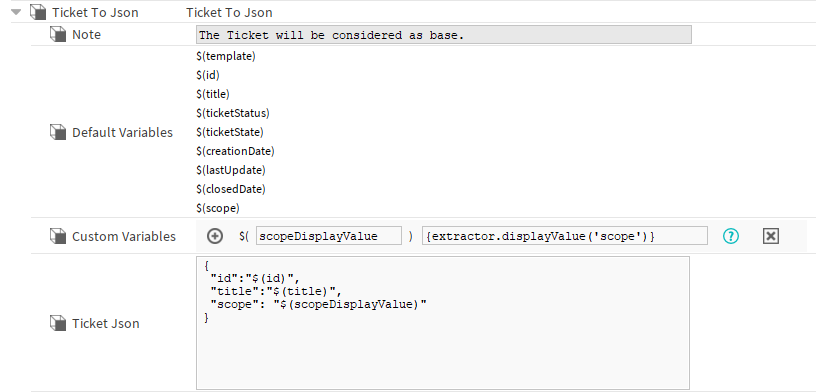
DefaultVariables: A predefined set of variables that provide quick access to standard Ticket data.
-
CustomVariables: Contains a list of variable. The input on the left defines the name of the variable, the right input defines the value of the variable. The variables can be reused in the TicketJson slot. It must use the following format: $(myVariable). The slot on the right handles SFormat.
-
TicketJson: Json Blueprint for a single Ticket.
Variables
-
${extractor}: Tool allowing you to retrieve the displayValues of your ticket’s slots.
Example: If you want to retrieve the displayValue of your status, create a custom variable with the ${extractor.displayValue('ticketStatus')} value.
Exemple with the scope display value: