
Description
The TicketScopeSlotDefinition component will allow you to customize your Tickets statuses.
Refer to Ticket synchronization for more information.
Implementation
-
Present in the TicketTemplate by default.
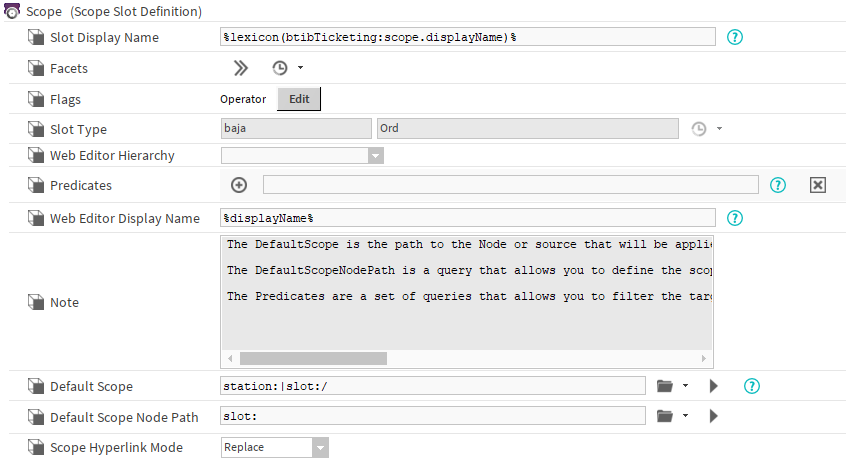
Properties
-
SlotDisplayName: Defines the slot's DisplayName
-
Facets: Defines the facets applied to the slot
-
Flags: Defines the slot's flags
-
SlotType: The type of the created slot in the Ticket
-
WebEditorHierarchy: Defines the hierarchy displayed in web views. You can select a scope from this hierarchy.
-
Predicates: Filters Components to which you can assign Tickets.
Accepts an SFormat which resolves to-
a “neql:…” query or
-
the “where …” part of a bql query.
-
If there are multiple predicate, an “or” operation is applied to get the result.
-
WedEditorDisplayName: An SFormat defining Node display names in the hierarchy within web views.
-
DefaultScope: Default scope used on Ticket creation if none is given.
-
DefaultScopeNodePath: Relative path or NEQL defining the Node or Source position set as default scope in the new ticket creation view.
-
ScopeHyperlinkMode: Defines how the scope hyperlink opens in the web view.
Additional rules regarding predicates:
-
If a predicate is empty, it is considered true → the overall result of the predicates is therefore true.
-
If a predicate is invalid (for example, a syntax error like a misspelled NEQL), then the overall result is false, even if the other predicates are valid.
→ In other words, a single invalid predicate prevents the ticket from being created.