
Used as
-
Card
Summary
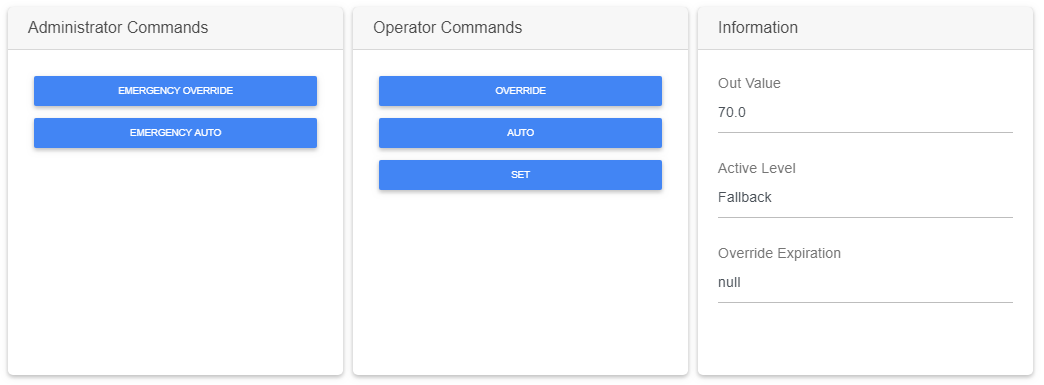
The card allows you to invoke actions on a point (and actions from a MeterExt) according to user rights (commands are hidden if a user doesn't have the right permissions).
The left part is dedicated for admin actions, the middle part for operator commands and the right part for information.
Implementation
There are two ways to add it to the FlexView:
-
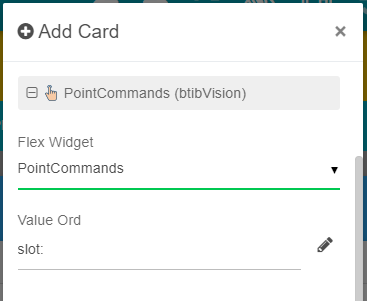
Add a card from the settings bar, and choose in the list PointCommands
-
Or drag&drop it from the palette
The extension is dedicated to Writable points.
Permissions
The buttons will appear according to the permissions. The user will need "Invoke Operator" to see operators commands and "Invoke Admin" to see administrator commands.
Action names
Any actions can be renamed in the btibVision lexicon with this lexicon key model: PointCommands.action.[action_name].
If a no lexicon key is present, the display name of the action will be displayed.
Special case for the MeterExt
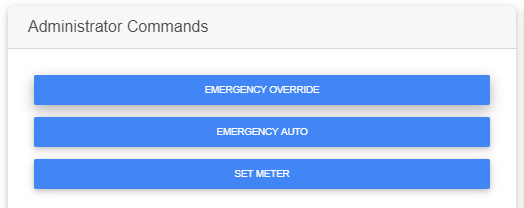
If the point contains a MeterExt, a button "Set Meter" will appear
Flex Widget Properties
-
ValueOrd: The Ord of the point. It can be relativized with slot: or slot:../../myPoint etc.
SFormat is supported.