Description
This block is used to apply a delta between values.
By default, the delta block computes the difference between two consecutive records, but it is possible to filter out invalid records and perform the operations only between valid records.
Implementation
-
Drag and drop a delta block from the palette in a data strategy
Properties
-
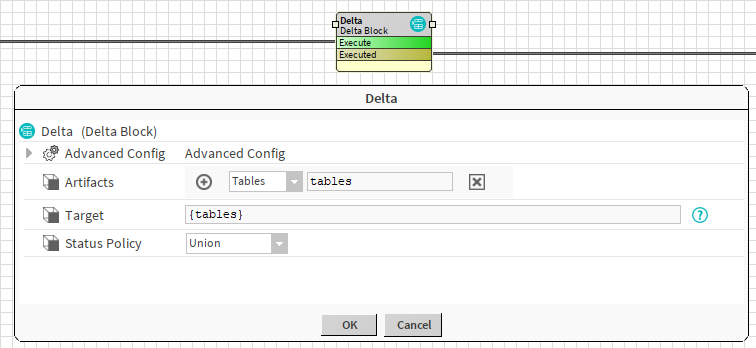
Artifacts: Artifacts created by this block
-
Tables: the resulting table.
-
-
Target: the table on which the delta will be applied.
-
StatusPolicy {Union, Intersection}: Define how the delta on the status will be computed:
-
Union: Sum of the two statuses. Ex: the union of {fault, down, alarm} and {alarm} is {fault, alarm, down}
-
Intersection: Common parts of the two statuses. Ex: the intersection of {fault, down, alarm} and {alarm} is {alarm}
-
Advanced Properties
-
DeltaPolicy {Previous, Next}: How the delta will be computed
-
Previous: the result in a given row will be the delta of the current row and the previous one
-
Next: the result in a given row will be the delta of the next row and the current one
-
-
InvalidStatus: Allows selecting which records will be considered invalid, depending on their values.
-
FilterZeroValues: Allows filtering records whose value is equal to 0.
Example:
Here is a collection table:
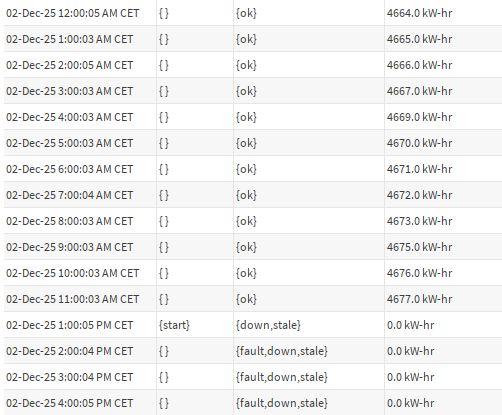
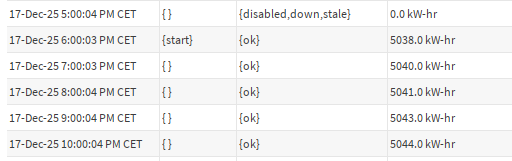
From December 2 to December 17, we experienced a communication loss. In this interval, all the values are equal to 0.
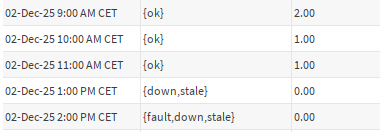
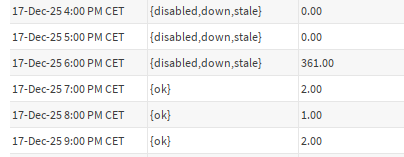
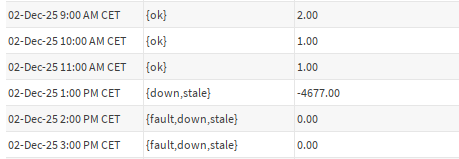
If we use the standard Delta configuration, the deltas will be computed between each records and we will observe big jumps in the deltas:
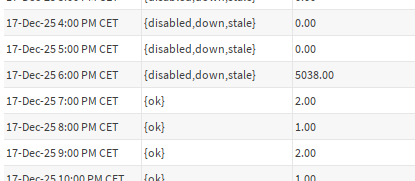
By setting FilterZeroValues to true, or InvalidStatus set to down, the deltas will only be computed on the valid values, giving us the following result.